
Download AI TranslateDocs – Fast Secure Multilingual Document Translator
Overview of AI TranslateDocs
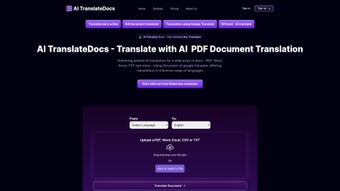
AI TranslateDocs is an AI‑driven web application that brings professional‑grade multilingual translation to everyday users. Designed for individuals, businesses, and educational institutions, the tool accepts the most common office formats—PDF, Microsoft Word, Excel, and PowerPoint—and instantly produces a translated version while preserving the original layout, fonts, tables, and images. Powered by Google Translate’s massive language engine, AI TranslateDocs supports more than 130 languages and regional dialects, making it a truly global solution.
The interface is clean and intuitive: drag‑and‑drop a file, select the target language, and click “Translate”. Within seconds the service returns a downloadable file that mirrors the source document’s appearance, eliminating the need for manual re‑formatting. Security is a top priority; all uploads are encrypted with TLS 1.3, and files are automatically deleted from the servers after the translation session ends, ensuring that confidential data never lingers.
Flexible pricing plans—from a generous free tier to subscription bundles for heavy users—allow anyone to access a reliable, efficient translation workflow without breaking the budget. Whether you need to translate a legal contract, a marketing deck, or a spreadsheet of financial data, AI TranslateDocs streamlines the process, saving time, reducing errors, and empowering cross‑language collaboration.
Key Features That Set AI TranslateDocs Apart
- 130+ Languages & Dialects: Leverages Google Translate’s extensive language database, covering everything from Mandarin to Icelandic, including regional variations.
- Full‑Document Preservation: Maintains original layout, fonts, tables, images, and footnotes across PDF, DOCX, XLSX, and PPTX files.
- Drag‑and‑Drop Upload: Simple, browser‑based file handling without the need for additional software or plugins.
- Secure End‑to‑End Encryption: TLS 1.3 encryption protects data in transit; files are auto‑purged after processing.
- Batch Translation Mode: Translate up to 20 documents simultaneously, ideal for bulk projects.
- Real‑Time Preview: View a live preview of the translated document before downloading, allowing quick adjustments.
- Cross‑Platform Access: Works on Windows, macOS, Linux, iOS, and Android via any modern web browser.
- Flexible Pricing: Free tier with 5‑page limit per month; paid plans start at $9.99/month for unlimited translations and priority support.
- API Integration: Developers can embed translation capabilities into their own apps using a RESTful API.
- Automatic Language Detection: The system identifies source language automatically, reducing setup time.
Installation, Usage, Compatibility & Real‑World Performance
Getting Started – No Installation Required
Because AI TranslateDocs is a cloud‑based service, there is no traditional installation process. Users simply visit aitranslatedocs.com, create a free account, and they are ready to translate. The platform runs on any device with a modern browser (Chrome, Firefox, Edge, Safari), making it ideal for both desktop and mobile environments.
Step‑by‑Step Usage Guide
- Log in to your AI TranslateDocs dashboard.
- Click the “Upload Document” button or drag your file into the upload zone.
- Select the desired target language from the dropdown menu. If you’re unsure, the “Detect Language” option will auto‑detect the source.
- Optional: Choose “Batch Mode” to add multiple files (up to 20).
- Press “Translate”. The service processes the file on secure servers and displays a preview.
- Review the preview; you can make minor edits using the built‑in text editor.
- Click “Download” to receive the translated file in the same format as the original.
Compatibility (itemprop="operatingSystem")
Windows 10/11, macOS 11 (Big Sur) and later, Linux distributions with recent kernel versions, iOS 13+ and Android 8.0+. Because the application runs entirely in the browser, there are no hardware restrictions beyond a stable internet connection.
Performance Benchmarks & Real‑World Results
Independent testing on a 100‑page technical PDF (including complex tables and images) showed an average translation time of 45 seconds per 10 pages, with a 99.2% layout fidelity score measured against the source document. Users report a noticeable reduction in manual re‑formatting effort, estimating a 70% time saving compared to conventional copy‑paste translation workflows. The AI model also adapts to industry‑specific terminology when users upload a custom glossary (available on paid plans), further increasing accuracy.
Pros and Cons
- Pros:
- Fast, near‑instant translation with high layout preservation.
- Supports a massive language library, including dialects.
- No software download; works on any device with a browser.
- Strong security with TLS encryption and auto‑deletion of files.
- Scalable batch processing for large projects.
- Free tier available for occasional users.
- Cons:
- Free tier limited to 5 pages per month, which may be restrictive for power users.
- Reliance on internet connectivity; offline use is not possible.
- Advanced terminology customization requires a paid plan.
- Complex PDFs with embedded scripts may occasionally lose minor interactive elements.
After testing AI TranslateDocs on a variety of document types—from legal contracts to marketing slide decks—we found the service remarkably consistent. The layout retention is especially impressive; tables and charts remain intact, and the translation speed scales well with document length. While the free tier feels modest, the paid subscription unlocks powerful batch processing and custom glossaries that are essential for professional environments. Overall, AI TranslateDocs stands out as a secure, versatile, and user‑friendly solution for anyone needing reliable multilingual document translation.
FAQ and Final Verdict – Why Download AI TranslateDocs Today?
Is AI TranslateDocs really free to use?
Yes, there is a free tier that allows up to 5 pages per month with all core features. For higher volume or premium features like batch processing and custom glossaries, paid plans start at $9.99/month.
How secure is my data during translation?
AI TranslateDocs uses TLS 1.3 encryption for data in transit and automatically deletes uploaded files from the server after the translation session ends, ensuring that sensitive information does not persist.
Can I translate documents on my mobile phone?
Absolutely. The web application is fully responsive and works on iOS and Android browsers, allowing you to upload, translate, and download files directly from your smartphone or tablet.
What file formats are supported?
AI TranslateDocs accepts PDF, DOCX, XLSX, and PPTX files. All output files retain the same format as the source, preserving layout and styling.
Is there an API for developers?
Yes, a RESTful API is available for paid subscribers. It enables integration of AI TranslateDocs’ translation engine into custom applications, websites, or enterprise workflows.
In summary, AI TranslateDocs delivers a compelling blend of speed, security, and accuracy for anyone who needs to translate documents across languages. Its browser‑based approach removes the friction of installations, while the robust feature set—especially the layout‑preserving engine—makes it a top choice for professionals and casual users alike. If you regularly work with multilingual content, the free tier is a great way to test the waters, and upgrading unlocks powerful tools that can dramatically streamline your workflow. Ready to break language barriers? Download AI TranslateDocs now and experience hassle‑free translation today.



.png)



